 BgRaster







Inspiration
BgRaster is inspired by the classic Sysinternals utility BgInfo. It was executed perfectly in 2000, but its structure and features feel dated today. In particular, it's focussed on the needs of an IT administrator from that era. It's missing many features that would be valuable to a creative professional in the 2020s.
Summary
BgRaster is a fast console application that uses modern frameworks and APIs to generate and assign wallpapers for any displays it finds. It has many features targetted at creative professionals like AV technicians, video engineers, and real time graphics specialists. It has a rich set of command-line options, but its full power lies in its TOML configuration files.
Highlights
- One PNG per video output - each Windows monitor receives a wallpaper sized to its native resolution, anchored to its desktop position.
- Multiple layers - text, network adapter info, labeled edges, custom logos (SVG/PNG), alignment grids, crosshairs, and solid backgrounds, each with independent positioning and styling.
- Format strings -
${tokens}for dynamic substitution in text and network layers, with<br>line breaks and independent size/color cycling per rendered line. - Slices - outputs have one slice by default, but can be split into any number, each with different settings.
- Short-lived - BgRaster runs until its work is done then exits. No lingering processes, no HTML rendering overhead, no OS hooks.
- Idempotent - early-exits when configuration, version, and hardware fingerprint all match the previous run.
- Portable - single-file
.exewithout runtime dependencies, built for speed via NativeAOT compilation.
Sample output
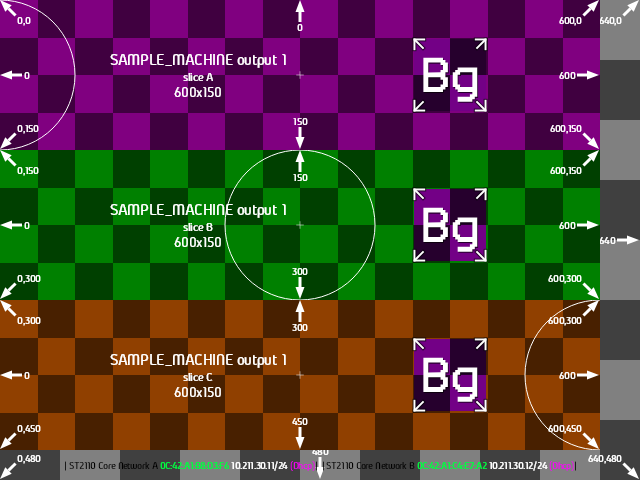
View sample TOML
# $schema: https://raw.githubusercontent.com/gameshowpro/BgRaster/refs/heads/main/docs/schemas/bgraster-config.schema.json

[text]
format = ["${MachineName} output ${OutputIndexPlusOne}<br>", "slice ${SliceLetterMinusOne}<br>", "${SliceWidth}x${SliceHeight}"]
size = ["16px", "12px", "14px"]
anchor-x = "center"
anchor-y = "center"
text-align = "center"
x = ["33vw"]
y = ["50vh"]

[background]
color = ["#808080", "#800080", "#008000", "#904000"]

[circle]
color = ["#ffffff"]
stroke = ["1"]

[logo]
x = "75vw"
y = "50vh"
width = "40vw"
height = "50vh"

[[output]]
target = 0

[output.grid]
size = "25vh"

[[output.slice]]
x = "0"
y = "0"
width = "100vw"
height = "100vh"

[output.slice.network]
render = true
require_subnet = "10.211.30.0/24"
adapter_format = [" | ${Name} ", "${MacAddress} ", "${IpAddresses}", "| "]
ip_address_format = ["${Address}/${CidrBits}", " (${Origin})"]
color = ["#000", "#00ff40", "#fff", "#ff00ff"]
size = ["2vh"]
x = "50vw"
y = "98vh"
anchor-x = "center"
anchor-y = "bottom"
text-align = "center"

[output.slice.text]
size = ["0"]

[output.slice.circle]
size = "0"

[output.slice.grid]
size = "12.5vh"

[[output.slice]]
x = "0"
y = "0"
width = "600px"
height = "150px"

[output.slice.circle]
x = "0"

[[output.slice]]
x = "0"
y = "150px"
width = "600px"
height = "150px"

[[output.slice]]
x = "0"
y = "300px"
width = "600px"
height = "150px"

[output.slice.circle]
x = "100vw"

########### Everything from here ownwards is for sample-building purposes.
########### Remove this is you're copying this sample to a production-ready config file.
[render]
no-assignment = true
no-discovery = true
machine-name = "SAMPLE_MACHINE"
force = true
simulate-network = true

[render.hardware_output]
index = 0
desktopX = 0
desktopY = 0
widthPx = 1200
heightPx = 630
dpiX = 96
dpiY = 96
rotation = 0
adapterName = "Sample Adapter"
friendlyName = "Sample Hardware Output"
Supported environments
| Component | Requirement |
|---|---|
| OS | Windows 10 1809+ or Windows 11 |
| Architecture | x64 |
| Privileges | Any user |
| DPI | Per-Monitor v2 aware |
Linux and macOS are not supported - the project is intentionally Windows-specific.
When does the wallpaper get updated?
Like the original BgInfo, BgRaster runs gets its work done as fast as possible and shuts down. Depending on your use case, you might want to automate its execution with a login script, scheduled task or simply a desktop shortcut.
Quick start

With Chocolatey installed and the default repository in your sources list, run the following from an administrative PowerShell session (Chocolatey installs machine-wide and requires elevation):
choco install BgRaster -y
Note
Chocolatey packages undergo a moderation process which can take several days to a week. If the Chocolatey badge shows a version older than the latest GitHub release and you want the new version immediately, please use winget or the manual installation option below.
With the Windows Package Manager (winget, included in Windows 10 1809+ and Windows 11), run:
winget install GameshowPro.BgRaster
This unzips BgRaster into winget's package store and exposes it as a BgRaster command on your PATH.
Note
Running this command in an administrative shell is recommended so that later you can run BgRaster from any directory without specifying its full path.
Like Chocolatey, winget submissions are moderated and can lag the latest GitHub release by a few days.
Download the latest BgRaster.zip from the Releases page, unzip it, and place the extracted files anywhere on disk. BgRaster.exe and libSkiaSharp.dll need to stay in the same folder. If you want debugging symbols, download BgRaster.pdb separately.


git clone https://github.com/gameshowpro/GameshowPro.git
cd GameshowPro/BgRaster
dotnet publish src/BgRaster.csproj -c Release -r win-x64 /p:PublishAot=true
src/bin/Release/net10.0/win-x64/publish/BgRaster.exe.
First run, no arguments
.\BgRaster.exe
%TEMP%\BgRaster\ and a lastRun.toml describing what it did. The PNGs as assigned to the desktop of each output.
Generate default config file
.\BgRaster.exe --config %programdata%\BgRaster\config.toml
The next time you run, it will load its config from this file rather than using defaults. If you don't specify a config file path, it will still find it if it exists in one of the default locations:
1. In the same folder as BgRaster.exe.
1. %ProgramData%\BgRaster
1. %LocalAppData%\BgRaster
1. %AppData%\BgRaster
Sample configurations
Identification overlay - show machine name, output index, and resolution on each screen:
[text]
format = ["${MachineName} output ${OutputIndexPlusOne}"]
subtitle = ["${Width}x${Height}"]
size = ["3vh"]
x = ["85vw"]
y = ["85vh"]

[background]
color = ["#101820"]

[grid]
size = ["100px"]
coordinates = [true]
Network adapter info - display MAC, IP addresses, speed, and status per output:
[network]
render = true
adapter_format = "${Name}<br>", "${MacAddress}<br>", "${Speed} ${Status}<br>", "${IpAddresses}"
color = ["#000", "#a0a0a0", "#808080", "#FFFFFF"]
size = ["2vh", "2vh", "2vh", "3vh"]
x = "95vw"
y = "5vh"
anchor-x = "right"
text-align = "end"
<br> tokens create line breaks. Size and color arrays cycle independently per rendered line - first adapter name gets size[0]/color[0], first IP line gets size[1]/color[1], wrapping around.
Per-output color wash - cycle red / green / blue across three outputs:
[background]
color = ["#FF0000", "#00FF00", "#0000FF"]
Slice a 4K wall into four HD quadrants:
[[output]]
target = 0

[[output.slice]]
x = "0"
y = "0"
width = "50vw"
height = "50vh"

[[output.slice]]
x = "50vw"
y = "0"
width = "50vw"
height = "50vh"

[[output.slice]]
x = "0"
y = "50vh"
width = "50vw"
height = "50vh"

[[output.slice]]
x = "50vw"
y = "50vh"
width = "50vw"
height = "50vh"
Labeled edges - show desktop coordinates at screen edges for alignment (great for multi-projector blends):
[labeled-edges]
scope = "Desktop"
side = ["TL", "T", "TR", "R", "BR", "B", "BL", "L"]
text-size = ["10px"]
tail-length = ["10px"]
thickness = ["3px"]
Documentation
- Features - A summary of visual features with images and config examples.
- TOML schema reference - every section, key, type, default, and unit.
- CLI schema reference - every command-line option mapped to its TOML equivalent.
AI Disclosure
As a project started in 2026, yes, substantial parts of this application were built using AI tools. I could never have acheived the the application scope, automation, test framework, and quality of documentation in my spare time without it. Be assured that the design, concept, functional testing, and documentation proof-reading burned many human neuron hours.
I also built BgRaster to make it easy to have your LLM of choice help you with your complex configuations. Just point it as this documenation, describe what you're looking for, and have it generate the config file for you.
Authors


Hi, I'm Hamish Barjonas. I provide custom solutions for the broadcast producion, live entertainment, and sports industries. Yes, including game shows. See more details here. As a keen FOSS advocate, I try to keep as much non-customer-specific code open for the wider community as possible, under the Game Show Pro umbrella. If you're in a related industry, I'd love to colloborate! You can contact me here.
License
This project is licensed under the MIT License.